Understanding Basic Multithreading Concepts Understanding Basic Multithreading Concepts Concurrency and Parallelism In a multithreaded process on a single processor, the processor can switch execution resources between threads, resulting in concurrent execution. In the same multithreaded process in a shared-memory multiprocessor environment, each thread in the process can run on a separate processor at the same time, resulting in parallel execution. When the process has fewer or as many threads as there are processors, the threads support system in conjunction with the operating environment ensure that each thread runs on a different processor. For example, in a matrix multiplication that has the same number of threads and processors, each thread (and each processor) computes a row of the result. Looking at Multithreading Structure Traditional UNIX already supports the concept of threads–each process contains a single thread, so programming with multiple processes is programming with multiple threads. But a process is also an address space, and creating a process involves creating a new address space. Creating a thread is much less expensive when compared to creating a new process, because the newly created thread uses the current process address space. The time it takes to switch between threads is much less than the time it takes to switch between processes, partly because switching between threads does not involve switching between address spaces. Communicating between the threads of one process is simple because the threads share everything–address space, in particular. So, data produced by one thread is immediately available to all the other threads. The interface to multithreading support is through a subroutine library, libpthread for POSIX threads, and libthread for Solaris threads. Multithreading provides flexibility by decoupling kernel-level and user-level resources. User-Level Threads Threads are the primary programming interface in multithreaded programming. User-level threads [User-level threads are named to distinguish them from kernel-level threads, which are the concern of systems programmers, only. Because this book is for application programmers, kernel-level threads are not discussed.] are handled in user space and avoid kernel context switching penalties. An application can have hundreds of threads and still not consume many kernel resources. How many kernel resources the application uses is largely determined by the application. Threads are visible only from within the process, where they share all process resources like address space, open files, and so on. The following state is unique to each thread. Thread ID Register state (including PC and stack pointer) Stack Signal mask Priority Thread-private storage Because threads share the process instructions and most of the process data, a change in shared data by one thread can be seen by the other threads in the process. When a thread needs to interact with other threads in the same process, it can do so without involving the operating environment. By default, threads are very lightweight. But, to get more control over a thread (for instance, to control scheduling policy more), the application can bind the thread. When an application binds threads to execution resources, the threads become kernel resources (see “System Scope (Bound Threads)” for more information). To summarize, user-level threads are: Inexpensive to create because they do not need to create their own address space. They are bits of virtual memory that are allocated from your address space at run time. Fast to synchronize because synchronization is done at the application level, not at the kernel level. Easily managed by the threads library; either libpthread or libthread. Lightweight Processes The threads library uses underlying threads of control called lightweight processes that are supported by the kernel. You can think of an LWP as a virtual CPU that executes code or system calls. You usually do not need to concern yourself with LWPs to program with threads. The information here about LWPs is provided as background, so you can understand the differences in scheduling scope, described on “Process Scope (Unbound Threads)”. Note – The LWPs in the Solaris 2, Solaris 7, and Solaris 8 operating environments are not the same as the LWPs in the SunOSTM 4.0 LWP library, which are not supported in the Solaris 2, Solaris 7, and Solaris 8 operating environments. Much as the stdio library routines such as fopen() and fread() use the open() and read() functions, the threads interface uses the LWP interface, and for many of the same reasons. Lightweight processes (LWPs) bridge the user level and the kernel level. Each process contains one or more LWP, each of which runs one or more user threads. (See Figure 1-1.) The creation of a thread usually involves just the creation of some user context, but not the creation of an LWP. Figure 1-1 User-level Threads and Lightweight Processes 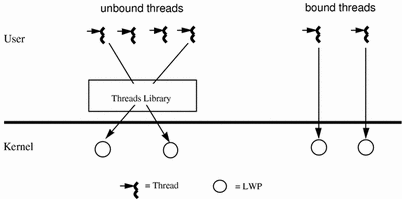 Each LWP is a kernel resource in a kernel pool, and is allocated (attached) and de-allocated (detached) to a thread on a per thread basis. This happens as threads are scheduled or created and destroyed. Scheduling POSIX specifies three scheduling policies: first-in-first-out (SCHED_FIFO), round-robin (SCHED_RR), and custom (SCHED_OTHER). SCHED_FIFO is a queue-based scheduler with different queues for each priority level. SCHED_RR is like FIFO except that each thread has an execution time quota. Both SCHED_FIFO and SCHED_RR are POSIX Realtime extensions. SCHED_OTHER is the default scheduling policy. See “LWPs and Scheduling Classes” for information about the SCHED_OTHER policy, and about emulating some properties of the POSIX SCHED_FIFO and SCHED_RR policies. Two scheduling scopes are available: process scope for unbound threads and system scope for bound threads. Threads with differing scope states can coexist on the same system and even in the same process. In general, the scope sets the range in which the threads scheduling policy is in effect. Process Scope (Unbound Threads) Unbound threads are created PTHREAD_SCOPE_PROCESS. These threads are scheduled in user space to attach and detach from available LWPs in the LWP pool. LWPs are available to threads in this process only; that is threads are scheduled on these LWPs. In most cases, threads should be PTHREAD_SCOPE_PROCESS. This allows the threads to float among the LWPs, and this improves threads performance (and is equivalent to creating a Solaris thread in the THR_UNBOUND state). The threads library decides, with regard to other threads, which threads get serviced by the kernel. System Scope (Bound Threads) Bound threads are created PTHREAD_SCOPE_SYSTEM. A boundthread is permanently attached to an LWP. Each bound thread is bound to an LWP for the lifetime of the thread. This is equivalent to creating a Solaris thread in the THR_BOUND state. You can bind a thread to give it an alternate signal stack or to use special scheduling attributes with Realtime scheduling. All scheduling is done by the operating environment. Note – In neither case, bound or unbound, can a thread be directly accessed by or moved to another process. Cancellation Thread cancellation allows a thread to terminate the execution of any other thread in the process. The target thread (the one being cancelled) can keep cancellation requests pending and can perform application-specific cleanup when it acts upon the cancellation notice. The pthreads cancellation feature permits either asynchronous or deferred termination of a thread. Asynchronous cancellation can occur at any time; deferred cancellation can occur only at defined points. Deferred cancellation is the default type. Synchronization Synchronization allows you to control program flow and access to shared data for concurrently executing threads. The four synchronization models are mutex locks, read/write locks, condition variables, and semaphores. Mutex locks allow only one thread at a time to execute a specific section of code, or to access specific data. Read/write locks permit concurrent reads and exclusive writes to a protected shared resource. To modify a resource, a thread must first acquire the exclusive write lock. An exclusive write lock is not permitted until all read locks have been released. Condition variables block threads until a particular condition is true. Counting semaphores typically coordinate access to resources. The count is the limit on how many threads can have access to a semaphore. When the count is reached, the semaphore blocks.
2024最新激活全家桶教程,稳定运行到2099年,请移步至置顶文章:https://sigusoft.com/99576.html
版权声明:本文内容由互联网用户自发贡献,该文观点仅代表作者本人。本站仅提供信息存储空间服务,不拥有所有权,不承担相关法律责任。如发现本站有涉嫌侵权/违法违规的内容, 请联系我们举报,一经查实,本站将立刻删除。 文章由激活谷谷主-小谷整理,转载请注明出处:https://sigusoft.com/64827.html